
Small businesses have generous set-aside opportunities in federal contracting – agencies must reserve a percentage of contracts for qualified 8(a), SDVOSB (service-disabled veteran–owned), WOSB (women-owned), HUBZone, and general small business firms[1][2]. However, finding and tracking these requires constant SAM.gov monitoring and careful filters. Procura automates this: by uploading your company’s capability statement, its AI continuously scans every SAM.gov solicitation (including full RFP attachments) and delivers only the bids you qualify for, complete with fit scores and summaries[3][4]. You don’t need to guess set-aside filters – Procura learns your SBA certifications and highlights relevant reserved contracts[5][4]. This blog shows common set-aside rules, then outlines how a small contractor can use Procura’s features (scanning, alerts, opportunity summaries, gap analysis) to find and track set-aside opportunities. We also give practical bidding tips (teaming, NAICS/size codes, RFP review) and a comparison of Procura versus free tools. Use Procura to spend less time searching and more time winning targeted set-asides.
Federal law and SBA regulations reserve portions of contracts for certain small-business categories. The 8(a) Business Development program is for socially/economically disadvantaged small firms (including many minority-owned, tribal, and Alaska Native entities). To qualify for 8(a), a company must be a small business and be at least 51% owned/controlled by U.S. citizens who meet SBA’s disadvantaged economic criteria (with net worth ≤ $850K, income ≤ $400K, assets ≤ $6.5M)[6]. 8(a) firms can pursue sole-source and set-aside contracts specifically for 8(a) participants, up to about $4.5–7 million (higher with justification)[7]. Participation is limited to nine years (4-year development + 5-year transitional stages)[8].
SDVOSB/VOSB. Service-disabled veteran–owned (and veteran-owned) small businesses are eligible for contracts set aside just for them. SBA requires at least 51% veteran ownership and control, and at least 51% by service-disabled veterans for the SDVOSB program[9]. (A veteran must be VA-verified.) The government aims to award ≥ 5% of federal dollars to SDVOSBs annually[10]. Certified SDVOSBs may compete for both SDVOSB set-asides and, in the VA market, “Vets First” sole-source contracts (though VA is transitioning certification to SBA VetCert)[9][10].
WOSB/EDWOSB. The Women-Owned Small Business federal program reserves contracts for firms at least 51% owned and operated by women U.S. citizens. To be SBA-certified as a WOSB, a business must meet the size standard (NAICS-based small size) and be 51% owned/controlled by women[11]. Economically disadvantaged WOSBs (EDWOSBs) must also meet personal net worth and income thresholds (e.g. personal net worth < $850K, income < $400K)[12]. WOSB/EDWOSB firms must apply for certification through SBA’s VetCert system; once approved, they can compete for contracts set aside for women-owned businesses[11][13].
HUBZone. Businesses in Historically Underutilized Business Zones (HUBZones) can qualify for a 10% price preference and set-asides. SBA requires a firm to be small, at least 51% U.S.-owned, have its principal office physically located in a HUBZone, and at least 35% of its employees living in HUBZones[2]. Certified HUBZone firms can then compete for HUBZone-only contracts and get preferential consideration in open competitions[2].
Small-Business Set-Asides. In general, any contract between $10,000 and $250,000 is automatically set aside for small businesses[1]. For contracts ≥ $250,000, contracting officers must first consider 8(a), HUBZone, SDVOSB, and WOSB set-asides; if none apply and at least two small businesses are available, the contract must be reserved for small businesses[1]. In practice, this means all above-category small-business programs take precedence, then a general “small business only” set-aside (often referred to as an “8(m)” set-aside) is used. In SAM.gov you can filter opportunities by Set-Aside type (e.g. “8(a)” or “HUBZone”) when searching, but Procura automatically aligns opportunities with the statuses (8(a), HUBZone, etc.) you indicate in your profile.
Procura transforms opportunity search by analyzing solicitations against your business profile instead of relying on keywords or manual filters. Step 1: Upload Your Capability Statement. After creating a team account on Procura, paste or upload a one-page capability statement that lists your services, NAICS codes, past performance, and SBA certifications[14]. (Procura even offers an AI “Capabilities Statement Assistant” to help generate this with guided prompts.) The system saves your SBA socio-economic statuses (8(a), SDVOSB, etc.) so it knows which set-asides you qualify for[5].
Step 2: Procura Scans and Ingests SAM.gov. Procura continuously monitors SAM.gov (the government’s repository of all federal solicitations) and automatically ingests every new posting[15][4]. There’s no need to run manual SAM searches or set filters for each search – Procura’s AI reads the full solicitation and attachments, not just titles[15][4].
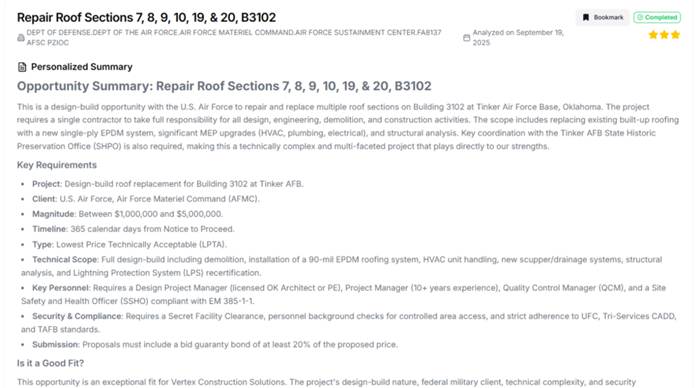
Step 3: Get Fit Scores. As new opportunities are published, Procura scores each one (0–3 stars) for fit to your business and highlights it if relevant[16][4]. Procura even provides plain-English summaries of each match, extracting the key scope and requirements for you[16][17]. For example, in this screenshot Procura flagged a DoD roofing project as a top fit, summarizing it as a multi-million-dollar design-build job with specific technical and security requirements:
Step 4: Review Opportunity Details. In Procura’s dashboard, click any opportunity to see full analysis. Procura will highlight sections like “Key Requirements,” “Is it a Good Fit?”, and any special clauses (e.g. bonding, security clearance) found in the RFP. You can also access the original solicitation documents for compliance checks. Because Procura understands your SBA statuses, it identifies set-asides automatically: if you are 8(a)-certified, for instance, Procura will surface 8(a) set-aside contracts as matches[5].
Step 5: Track and Manage. You can bookmark bids and Procura’s analyses are based on your capabilities, not just keywords .)
Practical Bidding Tips for Small Subcontractors
- Register & Update SAM.gov. Always keep your SAM profile current with accurate NAICS codes and SBA certifications[19]. Having correct NAICS in your SAM record and Small Business Search (DSBS) profile makes it easier for primes to find you and ensures Procura’s analysis is on-target[20][21]. Remember, you must be SAM-registered (with a Unique Entity ID) and declare your set-asides in SAM to bid[19][1].
- Filter Smartly (if using SAM.gov directly). On SAM.gov’s Contract Opportunities search, use advanced filters: by NAICS, agency, location, and set-aside category (8(a), HUBZone, etc.)[18]. Save those searches and turn on email alerts. (Procura makes this easier by doing it automatically.) For example, filtering on “HUBZone” will list only those HUBZone set-asides on SAM.gov, but in Procura you simply note your HUBZone status once and it surfaces matching HUBZone bids for you[5].
- Read RFP Details Thoroughly. Don’t rely on title/abstract alone. As one expert advises, “mandatory requirements (such as certifications or past performance thresholds) are often buried in attachments”[22]. Treat each opportunity as a “pipeline” item: once Procura points you to a bid, read the full PDF. Procura’s AI highlights contract requirements (e.g. certifications, clearances, or unusual clauses) in its summary, but you must verify critical details yourself[23]. Always double-check deadlines, bonding, and any specific compliance items by reviewing the original solicitation.
- Leverage Past Award Data. Use USAspending.gov or SAM Data Bank to research past contract awards in your NAICS. This reveals who buys what, typical contract sizes, and prime incumbents[24]. For example, knowing that the VA spent millions on IT support can guide you to set your target. Use this intel to refine your searches and bidding strategy.
- Teaming and Subcontracting Leads. Many small firms win as subs. Regularly check SBA’s SUB-Net (subcontracting opportunities) and the GSA Subcontracting Directory for primes seeking partners[25][26]. Complete your DSBS profile thoroughly – primes often search DSBS to find qualified subs. Procura can help here too: it will “flag” capability gaps in your analysis. If a promising bid scores low in an area (say you lack an experience component), Procura’s summary will implicitly highlight where a partner could fill that gap[27]. That insight helps you approach the right teaming partner or subcontractor for a complementary skill set, rather than blindly knocking on doors.
- NAICS and Size Standards. Correct NAICS codes are vital. Ensure your primary NAICS (and those listed in SAM/DSBS) match the work you pursue[20]. Also confirm you meet the SBA’s size standard for that NAICS (usually annual receipts or employee count). If your firm grows, update your status — losing “small” status could disqualify you. (Conversely, if you qualify under an 8(a) or HUBZone, highlight that in every proposal.)
- Stay Compliant and Prompt. Keep your SAM registration active (no lapses). Always watch proposal deadlines and amendments – Procura alerts help but verify changes on SAM.gov[28][23]. Check all FAR clauses in the solicitation (labor laws, cybersecurity requirements, etc.) and be ready to demonstrate compliance. Procura’s analysis will call out many requirements, but you must prepare them. For instance, if a bid requires a performance bond or security clearance (as in the sample summary above), ensure you can meet those conditions before bidding.
Procura vs. Free Sources (SAM.gov/Beta.SAM)
| Feature | Procura | SAM.gov (Free) |
| Set-aside Discovery | Auto-finds set-aside opps matched to your profile (8(a), HUBZone, SDVOSB, etc.); no manual filtering needed[5][4]. | Has filters for set-asides (8(a), HUBZone, SDVOSB, WOSB, etc.), but you must construct and remember each filter query[18]. |
| Alerts & Tracking | Continuous monitoring with email/notifications for new matching bids; built-in opportunity summaries and fit scoring[4][17]. | Saved searches with email alerts (manual setup). No fit-scoring; only title/synopsis, so you must open each alert and read RFPs yourself. |
| Opportunity Analysis | AI-generated executive summary highlights scope, requirements, set-aside eligibility, and fit score【36†】; reads full RFP attachments for context. | SAM.gov provides only the solicitation text/attachments with no analysis. You must manually read documents to extract requirements and set-aside info. |
| Subcontracting Leads | Not a subcontract directory. (Use SBA SUB-Net or DSBS.) Procura does highlight capability gaps to suggest teaming, but doesn’t list sub bids. | SBA SUB-Net and DSBS are free sources for sub-leads. SAM.gov does not include subcontract postings (SUB-Net covers that). |
| Cost | Paid (starting ~$399/mo). Aimed at small businesses to deliver enterprise-level insight affordably[29][30]. | Free to use (SAM.gov, SUB-Net, DSBS, FPDS). However, requires manual effort and time investment for equivalent coverage. |
Call to Action
Success in the federal marketplace demands prioritizing the right opportunities. Procura’s AI-enabled workflow empowers small subcontractors to focus on winning bids instead of endless searching[16][4]. By automatically surfacing the set-aside contracts you’re eligible for and summarizing them for quick review, Procura helps you reclaim hours of BD time[31][17]. Ready to see Procura in action? Book a live demo and let us show how our platform will keep you ahead in the set-aside pipeline.
Meet with the Procura Team to See How We Can Help

[1] Set-aside procurement | U.S. Small Business Administration
https://www.sba.gov/partners/contracting-officials/small-business-procurement/set-aside-procurement
[2] HUBZone program | U.S. Small Business Administration
https://www.sba.gov/federal-contracting/contracting-assistance-programs/hubzone-program
[3] [14] [15] Getting Started with Procura
https://procurafederal.com/docs/getting-started
[4] How to Find Federal Contract Opportunities (Without the Headache)
https://procurafederal.com/blog/how-to-find-federal-contract-opportunities
[5] [17] [19] [20] [21] [26] [27] [30] Getting Started in GovCon
https://procurafederal.com/blog/getting-started-in-govcon
[6] [7] [8] 8(a) Business Development program | U.S. Small Business Administration
[9] [10] Veteran contracting assistance programs | U.S. Small Business Administration
[11] [12] [13] Women-Owned Small Business Federal Contract program | U.S. Small Business Administration
[16] [31] Procura Federal – AI-Powered Federal Contract Search & Analysis
[18] [22] [23] [24] [25] [28] What tools make it easier to find government contracts?
https://procurafederal.com/blog/what-tools-make-it-easier-to-find-government-contracts
[29] Procura Federal FAQ – AI-Powered Federal Contracting