What is SAM.gov and Why Do You Need It?
Before you can bid on a single federal contract, you need one thing: an active SAM.gov registration. It’s the government’s front door, and it’s free, but it’s also one of the most common stumbling blocks for small businesses entering the federal market. If you’re lost on how to register on sam.gov, this guide walks you through every step, tells you exactly what to prepare, and explains what to do once you’re active so that registration turns into revenue.
SAM.gov (System for Award Management) is the U.S. government’s official portal for contractor registration, contract opportunities, and award data. It’s run by the GSA, and it’s the central hub where federal agencies verify vendors before issuing payments or awards.
Registration is mandatory. If your SAM registration isn’t active when a contract is awarded, you cannot receive that award. Every federal prime contractor must be registered, and most subcontractors working under federal primes are expected to be registered as well.
The good news: SAM.gov registration is free. If anyone charges you to register your entity on SAM.gov, they are not the government. Legitimate third-party consultants may charge to help you navigate the process, but the registration itself costs nothing.
Completing registration gives your business a Unique Entity ID (UEI), which replaced the old DUNS number system, and a CAGE code (assigned automatically for U.S. entities). These two identifiers become your permanent credentials in the federal marketplace. Agencies use your SAM profile to verify your size, certifications, NAICS codes, and banking details before awarding or paying you anything.
Pre-Registration Checklist: What to Gather Before You Start

The single biggest time-waster in SAM.gov registration is stopping mid-form to hunt down a piece of information. You should gather everything below before you start. If you prepare beforehand, the data entry will only take one to two hours.
Business Identity
- Legal business name exactly as it appears on your IRS or state incorporation documents (even capitalization matters and mismatches cause validation delays)
- Physical street address (P.O. boxes not accepted for entity validation)
- Business start date or date of incorporation
- State of incorporation
- Entity type (LLC, corporation, sole proprietor, nonprofit, etc.)
Tax & Financial Information
- Employer Identification Number (EIN): must match exactly what’s on file with the IRS
- Fiscal year-end date
- U.S. bank account routing number and account number (for Electronic Funds Transfer, this is how the government will pay you)
Business Classification
- Your primary NAICS code(s): the industry classification codes that describe what your business does. You can look these up at census.gov/naics before starting and you can list multiple.
- Product Service Codes (PSC) if you know them. These describe specific products or services and help contracting officers find you.
- Small business size status (SAM will calculate this based on NAICS employee/revenue thresholds)
- Any applicable socioeconomic certifications (veteran-owned, woman-owned, HUBZone, 8(a), etc.) have documentation ready if relevant
Points of Contact
- Name, title, email, and phone for your Government Business POC (typically the owner or BD lead, this is who agencies contact about contracts)
- Same details for your Electronic Business POC (typically the same person for small businesses, this person can access financial data in SAM)
- Optional: Past Performance POC, Alternate POC
Login Credentials
- A Login.gov account (the federal identity service) create one at login.gov if you don’t have one. You’ll need a valid email and two-factor authentication set up.
Step-by-Step SAM.gov Registration Walkthrough
Step 1: Log In via Login.gov
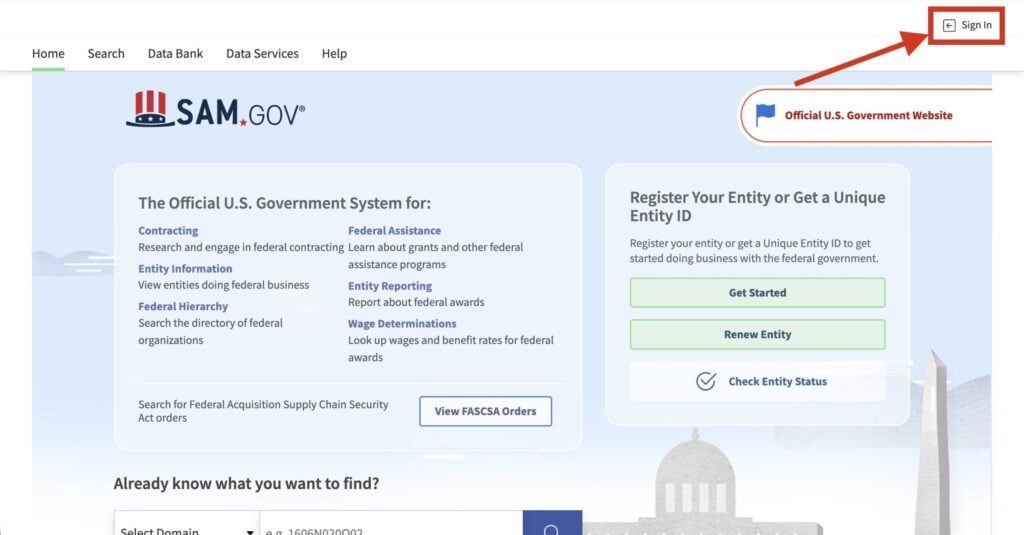
Go to sam.gov and sign in using your Login.gov credentials. If you’ve never used Login.gov, create your account there first. Once logged in to SAM.gov, navigate to Entity Information and click “Add New Entity.”
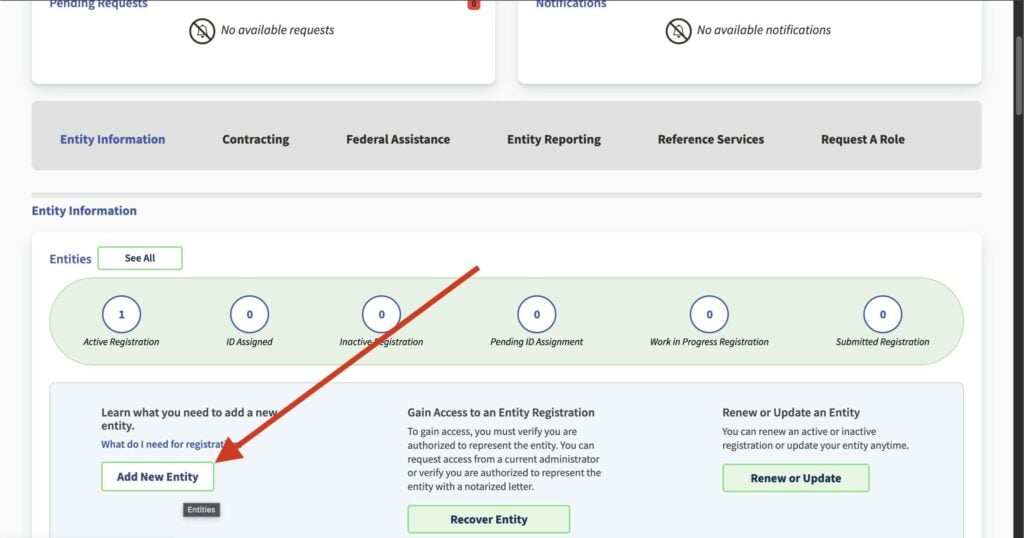
Step 2: Fill out the Questionnaire and Select Your Registration Purpose
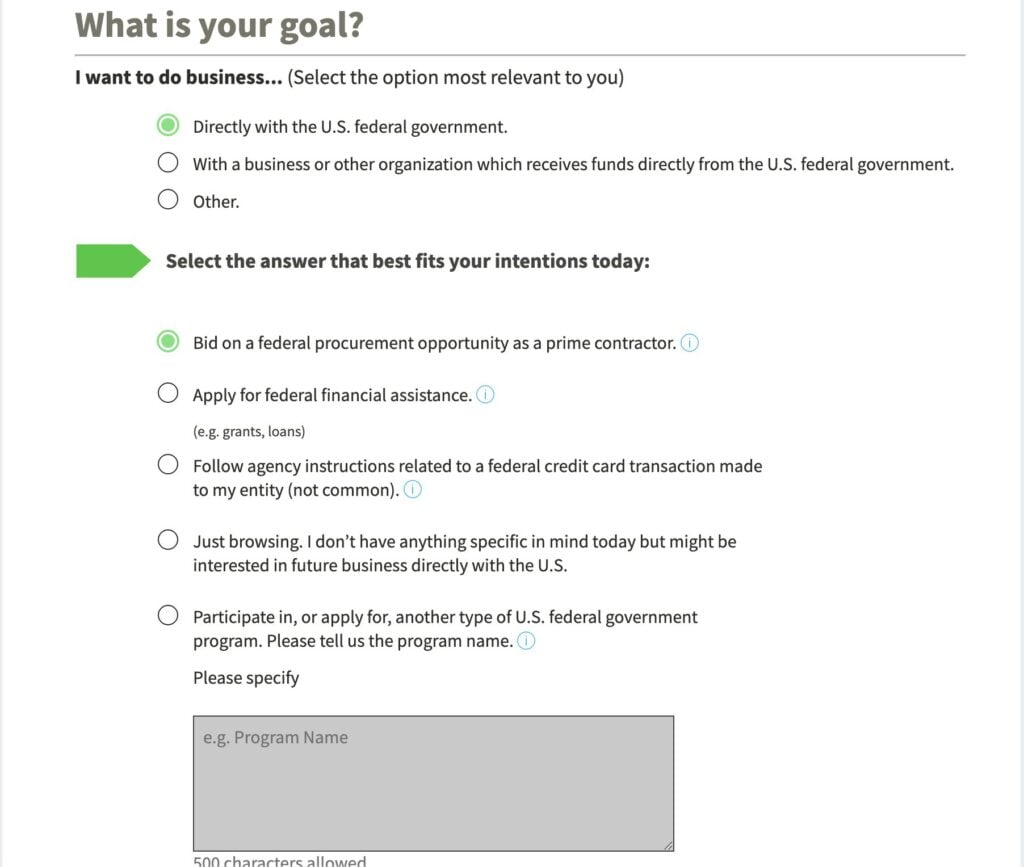
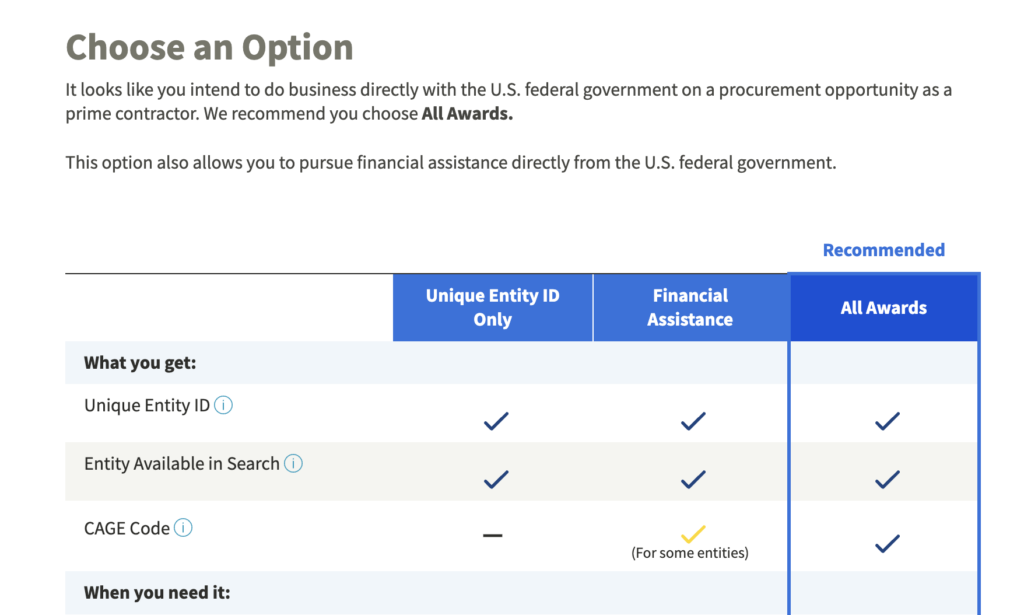
SAM.gov will ask why you’re registering. There is a helpful questionnaire that will determine what level of registration you need. For most businesses, you will select I want to do business… Directly with the U.S. federal government and Bid on a federal procurement opportunity as a prime contractor. A prime contractor is a contractor who holds a direct contract with the government. This is in contrast to a subcontractor, who contracts to the prime contractor. Registering as a prime contractor will also allow you to work as a subcontractor.
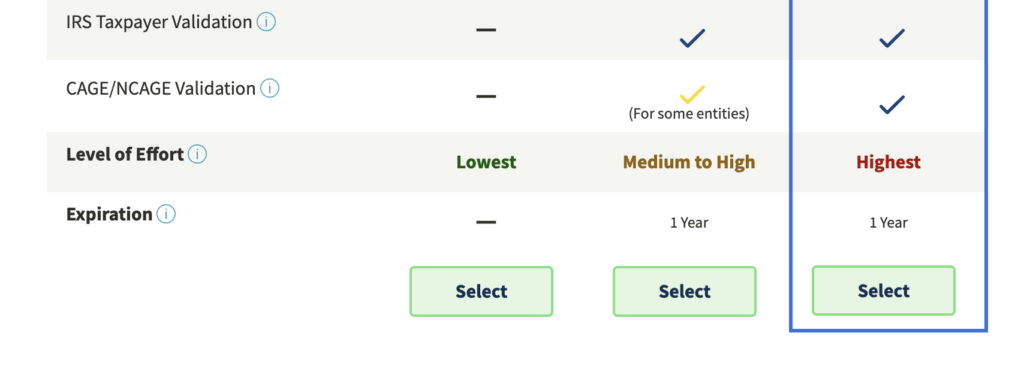
After the questionnaire, you will select your registration type. For most contractors who want to bid on federal contracts and receive grants, select “All Awards.” If you only need a UEI for a specific grant application and don’t plan to bid on contracts, you can select “Financial Assistance Awards Only”, but most businesses should choose All Awards to keep options open.
Step 3: Request Your Unique Entity ID (UEI)
Enter your legal business name, address, and incorporation details. SAM.gov will search for an existing match. If your entity already exists in the system (perhaps from a previous registration or a DUNS number), select it. If not, the system will generate a new UEI for you. This 12-character alphanumeric code is your permanent federal identifier, keep it on file and readily accessible.
Step 4: Enter Core Business Data
This is the main data-entry section. You’ll fill in your mailing address (if different from physical), NAICS codes, entity type, business size, and fiscal year-end date.
Step 5: Verify Your EIN with the IRS
Enter your EIN and consent for SAM.gov to validate it against IRS records. This is one of the most common points of failure. If your legal business name in SAM doesn’t exactly match what’s on file with the IRS, the validation will reject and delay your registration by days or weeks. Double-check the IRS spelling of your business name before this step (your EIN confirmation letter is the source of truth).
Step 6: Enter Banking Information (Electronic Funds Transfer)
Provide your U.S. bank routing number and account number. This is the account where the federal government will deposit payments. Triple-check these numbers.
Step 7: Complete Assertions (Goods & Services)
Confirm or refine your NAICS codes and add Product Service Codes. Being thorough here improves how often contracting officers find your profile when searching for vendors.
Step 8: Complete Representations & Certifications (Reps & Certs)
This is the longest section. It’s a multi-page questionnaire where you self-certify compliance with federal regulations. Topics covered include business size, ownership characteristics (veteran-owned, woman-owned, minority-owned, etc.), criminal and tax felony history, FAR clause compliance, and executive compensation disclosures.
Take your time here. These answers replace the paper certifications you’d otherwise have to submit with every single proposal. Once completed in SAM, they auto-populate when bidding on contracts. Rushing through and getting something wrong can cause bid disqualifications later. If you’re unsure about a specific question, the FSD (Federal Service Desk) can clarify at 1-866-606-8220.
Step 9: Add Points of Contact
Assign your Government Business POC and Electronic Business POC (required). For most small businesses, this is the same person. Add alternate contacts if you have them. These contacts appear publicly in the SAM directory, so they need to be correct. Contracting officers and potential teaming partners will use them.
Step 10: Review and Submit
Before clicking Submit, review every section. Pay special attention to your legal name, EIN, and banking details. Once submitted, the registration enters a validation queue. If you are registering a U.S. entity, the government will automatically assign a CAGE code during this process if you don’t already have one.
How Long Does SAM.gov Registration Take?
The data entry itself takes roughly one to two hours if you have everything prepared. The waiting period after submission is where the time goes: SAM.gov can take up to 10 business days to activate your registration after submission. In practice, plan for 10–15 calendar days total from submission to active status.
During this window, SAM.gov and affiliated agencies are verifying your TIN with the IRS and validating your entity details with the DoD CAGE office. If there’s a mismatch, even a minor one like “Inc.” vs “Incorporated”, you’ll receive an email asking you to correct and resubmit, which resets the clock.
Practical advice: Start your registration at least three to four weeks before any contract bid deadline. Waiting until a week before a proposal is due is one of the most common reasons small businesses miss opportunities they’re otherwise qualified for.
Common Problems & How to Fix Them
IRS Name Mismatch
The most common delay. Your legal business name in SAM must match the IRS records for your EIN exactly. Check your CP-575 EIN confirmation letter or call the IRS Business & Specialty Tax Line (1-800-829-4933) to confirm. Then enter the name in SAM exactly as it appears: abbreviations, punctuation, and spacing included.
Address Validation Failure
SAM.gov uses a USPS address validation system. If your address format doesn’t match USPS standards (e.g., “Suite” vs “Ste”), you’ll get an error. Use the USPS Address Lookup tool to find the standardized format before entering it.
Notarized Letter Requirement
In some cases, particularly for sole proprietors or businesses without a state registration, SAM.gov may ask for a notarized letter on company letterhead confirming your legal business name and address. This adds time. If you receive this request, respond promptly; the letter must match the SAM.gov Entity Validation template available in the notification email.
Registration Lapse
SAM registrations expire annually. You must renew every 12 months to remain eligible for contracts. SAM.gov sends email reminders at 60 and 30 days before expiration, but emails go to spam, people change jobs, and reminders get missed. Set a recurring calendar reminder 60 days before your renewal date as a backup. A lapsed registration means you can’t be awarded or paid on contracts until it’s reinstated.
Website Down or Timing Out
SAM.gov has a well-documented reputation for slow performance, especially during end-of-fiscal-year (September) and end-of-calendar-year periods. If the site is unresponsive, try early morning Eastern time (before 9 AM EST) or weekends. Don’t start a long form session without saving your progress frequently, sessions can time out and lose data.
What to Do After You’re Registered
An active SAM registration is the starting line, not the finish. Most small businesses celebrate getting registered, then wait for contracts to appear. That’s not how the federal market works.
Here’s what should happen next:
- Set up SAM.gov search alerts. Log into SAM.gov, run an advanced search for your NAICS codes and agency targets, save the search, and enable email notifications. This gives you a free baseline alert system.
- Research your target agencies on USAspending.gov. Before you bid on anything, spend an hour understanding who buys your type of work, how much they’ve paid, and who the incumbents are. This shapes your entire strategy.
- Build your capabilities statement. Your capabilities statement is your federal resume, it goes to contracting officers, primes, and teaming partners. You can sign up for a free month of Procura to generate your capabilities statement. Just select the starter plan and enter code FIRSTMONTHFREE at checkout.
- Start pursuing opportunities systematically. SAM.gov alone isn’t enough. The portal shows you what’s been posted, it doesn’t tell you which opportunities you’re qualified for, what’s buried in the attachments, or which ones are worth your BD time. That’s where Procura makes a ton of difference.
Procura will Find The Best Opportunities For You

Getting registered on sam.gov is step one, but winning contracts is the goal. This where most small businesses get stuck, because finding the right opportunities takes hours of manual work that most small businesses can’t spare.
Procura solves this problem. Once you’re registered in SAM.gov, Procura:
- Reads every SAM.gov solicitation, including all attachments. Not just titles and NAICS codes. The full PWS, SOW, and RFP documents. This is how compliance requirements, clearance needs, and past-performance thresholds get analyzed automatically, before you spend hours on an opportunity you’re not eligible for.
- Scores opportunities against your capability statement. You upload your capabilities statement once. Procura then matches every incoming solicitation against your specific strengths and flags your highest-fit bids.
- Delivers executive summaries directly to you. No more logging into SAM.gov, running searches, downloading PDFs, and reading 80-page RFPs just to decide if something is worth pursuing. Procura shows you what matters.
- Costs a fraction of the alternatives. Enterprise platforms like GovWin IQ run $2,000–$5,000+ per month. Procura starts at $399/month on an annual plan. We built Procura for small businesses like you, not huge companies with limitless budgets.
You can sign up for a free month of Procura today. Just select the starter plan and enter code FIRSTMONTHFREE at checkout.
Book a Demo: See Procura Working on Real Opportunities
Once your SAM registration is active, the next question is: which contracts should you actually pursue? We’ll walk you through that live — with your NAICS codes, your capability profile, and real opportunities matched to your business. Schedule 30 minutes below.
Check your listing once you are registered. Procura’s free UEI lookup and CAGE code lookup find any registered company, and the contractor explorer shows its awards and registered NAICS codes. It’s all free to browse; create a free account to save your research and export the tables.
Frequently Asked Questions
Nothing. SAM.gov registration is completely free. If you receive a bill from any company for SAM.gov registration, it is not the government. Legitimate consultants may charge to assist, but the government charges no fee.
Data entry takes 1–2 hours if you’re prepared. After submission, allow up to 10 business days for activation — budget 10–15 calendar days total. Start at least 3–4 weeks before any contract bid deadline.
The Unique Entity ID (UEI) is a 12-character identifier assigned during SAM.gov registration, replacing the DUNS number. It is required to bid on federal contracts or receive federal grants. SAM.gov generates it automatically when you register.
Every 12 months. Renewals can start 60 days before expiration. A lapsed registration means you cannot be awarded contracts or receive payments until reinstated, which takes another 10+ business days.
SAM.gov replaced FedBizOpps in 2019. All federal solicitations above $25,000 are now posted at sam.gov/opportunities under the Contract Opportunities module.
Not always legally required, but most large primes prefer or require SAM-registered subcontractors. Having an active registration significantly improves your credibility when approaching primes for teaming opportunities.

Sources: GSA About SAM.gov; SAM.gov Entity Registration Checklist (November 2024); SAM.gov Entity Registration page; Valley SBDC SAM Registration Guide; Dayton Ohio SAM.gov Infographic; Federal Processing Registry SAM Success Checklist; Procura Federal Contracting Glossary.